Using EasyCargo to Optimize Load Planning for Double-Decker Trailers
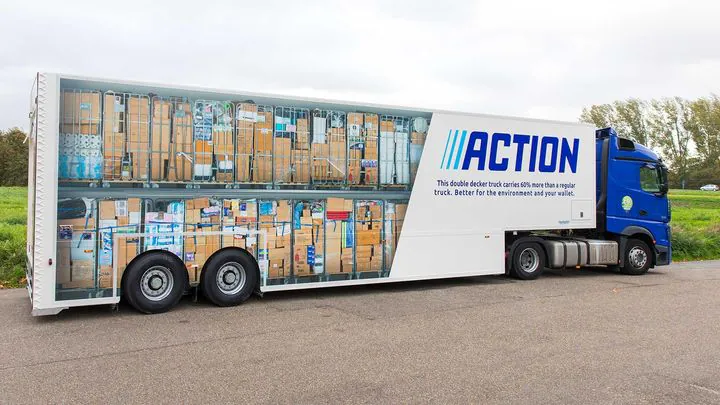
Double-decker semi-trailer trucks are recognized as a groundbreaking solution in modern logistics management. The core value of this vehicle type is not merely the capacity to hold more pallets, but the highly efficient optimization of vertical space. This typically results in the ability to transport double the volume of goods, particularly for light or fragile items that are not suitable for stacking.
Before diving into the specifics of double-decker loading, you might also be interested in our guide on how to create an oversized cargo load plan, which covers other complex loading scenarios for non-standard dimensions.
A significant economic benefit of double-deck trailers is the reduction of the number of trips, which helps save fuel costs while simultaneously minimizing carbon emissions, contributing to environmental protection. It is due to these advantages that major retail corporations, such as Action, are actively integrating these vehicles into their transportation fleets.
When your business decides to deploy double-decker trucks, the question arises: How can goods be loaded, and how can the payload be optimized precisely using EasyCargo load planning software?
Currently, EasyCargo does not automatically load double-decker trucks. This is because the variability in design, flexible height, and removable nature of auxiliary decks complicates the optimization algorithm. However, we have developed an effective workaround method that provides maximum flexibility for your specific truck design. We will guide you on how to simulate the loading process for both the lower and upper decks to achieve maximum space utilization efficiency.
How to Load a Double-Decker trailer in EasyCargo
The method for simulating two-tier loading relies on the flexible use of the Maximum Loading Height and load capacity function. The entire process is divided into two clear and independent stages:
Loading the Double Deck system
Lower deck:
- Space Setup: Create a virtual loading space (semi-trailer) with its full, standard physical dimensions.
- Payload Adjustment: Since you are splitting the load into upper and lower parts, you should reduce the total payload capacity of the cargo space by half. Additionally, remember to add the weight of the double-decker system itself (usually 500-800 kg) to the tare weight. Alternatively, you can account for it in the payload reduction to ensure the axle weight calculations remain accurate. For more detailed instructions on managing weight limits, check out our Cargo space journal.
- Height Restriction: In the loading settings, you need to input and apply the maximum loading height, which must precisely match the height of the lower deck. For example, if the auxiliary deck is installed at a height of 150 cm, you would set the loading height restriction to 150 cm. Accuracy is a key factor in preventing damage to the goods when the upper deck is lowered.
- Optimization: EasyCargo will then automatically optimize and only load goods within the limited height range of the lower deck.
Upper deck:
- Filter Items: After loading the lower deck, click Print, select “Remove loaded items from the input list,” and confirm by choosing “Basic view” or “Current view.” This clears the loaded items and leaves only the remaining cargo for the upper deck.
- Final Load: Simply hit the Load button again. EasyCargo will optimize the remaining items. Repeat the printing process to save the report for this deck. For more info, watch the tutorial video on loading into multiple cargo spaces.
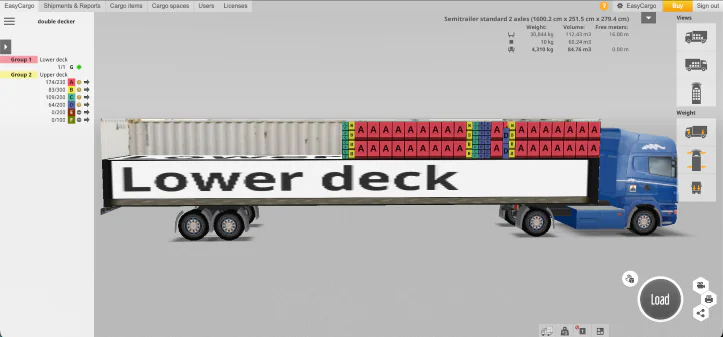
Advanced Visualization Tip: If you want to visualize both decks in a single image (for printing reports or easier control), you can use the following tip:
- After loading the lower deck (as in Stage 1), create a large cargo item (representing the lower deck) with a height equal to the height of the auxiliary deck (e.g., 150 cm) and length/width equal to the floor dimensions of the vehicle.
- Next, place this dummy cargo item first, followed by automatically stacking all of the upper deck goods on top of this dummy item. This method helps ensure that the upper deck goods are positioned precisely above the deck support points, preventing the goods from dangerously hanging between the lower deck items, while also visually representing the auxiliary deck.
Ready to Optimize Your Double-Decker Payload?
By applying these techniques within EasyCargo, you not only ensure optimal stacking efficiency and cost savings on transport but also enhance safety and regulatory compliance for every shipment.
EasyCargo provides you with a detailed 3D visual of both decks (fixed floor and auxiliary deck), making it easy for you to:
- Check Safety Compliance: Visually observe to ensure the load does not exceed the maximum height of the auxiliary deck and maintain the overall stability of the vehicle.
- Create Accurate Documentation: Provide detailed visual documentation for warehouse staff and drivers. To learn more about how to share these results, check out our post on what load plan report options EasyCargo offers to eliminate any errors during loading.
Don’t let valuable space in your double-decker truck go to waste! Experience firsthand how EasyCargo transforms complex stacking procedures into a simple, manageable solution.
Start your logistics optimization journey. Sign up for a free 10-day trial of EasyCargo today to take your loading efficiency to the next level!


Rămâneți în legătură cu noi