How to calculate a container’s…
First and foremost, all of the different calculations related to containers that we discuss in this article can be done more efficiently and much faster with our container and truck-loading software – EasyCargo. In this article, we will be talking about how we can do a lot of different calculations related to containers. In the end, this is what our software provides to our customers. Something that can take hours by hand, EasyCargo will do in seconds.

Looking for a quick answer?
Here is the information you’ll need to calculate loading plans:
-
- inner length (cm/in.) of your cargo space,
- inner width (cm/in.) of your cargo space,
- inner height (cm/in.) of your cargo space,
- dimensions of the items,
- quantities of the items.
First, calculate the volume of the cargo space. How? Simply multiply its length by its width by its height.
Next, calculate the volume of your load. Again, multiply the length, width, and height of the items and then multiply the result by the number of items you have. Now, you just need to check if the entire load fits into the cargo space. Take the volume of the cargo space and subtract the volume of the items.
If you’re interested in more information for the calculation or want to know how to simplify the entire process, keep reading.
…storage space?
Let’s start with the basics: How to calculate storage space in a container. The answer is simple: The only thing you need to know is the measurements of the container.
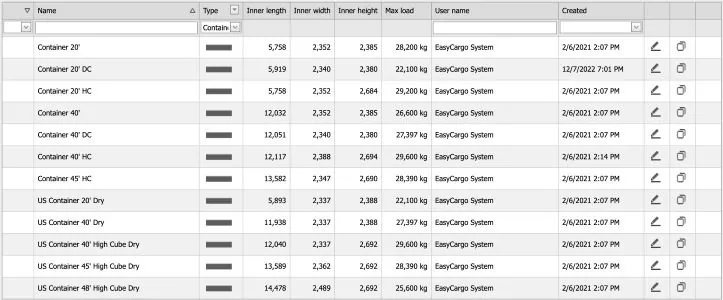
The picture below shows the most common types of containers our clients work with, but there are many others. Are you interested in learning what other types of cargo spaces exist? Check out our article about the different types of shipping containers as well as other cargo spaces and choose the one that suits you best.
| Container size | Inner length | Inner width | Inner height | Max payload |
|---|---|---|---|---|
| Container 20′ | 18′ 10.7″ | 7′ 8.6″ | 7′ 9.9″ | 28,200 kg (62,170 lb) |
| Container 20′ HC* | 18′ 10.7″ | 7′ 8.6″ | 8′ 9.7″ | 29,200 kg (64,375 lb) |
| Container 40′ | 39′ 5.7″ | 7′ 8.6″ | 7′ 9.9″ | 26,600 kg (58,643 lb) |
| Container 40′ HC* | 39′ 9″ | 7′ 10″ | 8′ 10.1″ | 29,600 kg (65,257 lb) |
| Container 45′ HC* | 44′ 6.7″ | 7′ 8.4″ | 8′ 9.9″ | 28,390 kg (62,589 lb) |
*HC (High Cube) containers have taller walls than standard containers, allowing for larger or bulkier cargo.
Please make sure your measurements are correct as EasyCargo works with the internal dimensions of the container. If these measurements are not accurate, then the shipment results will not be accurate either.
Simplify your life and use EasyCargo
At EasyCargo, we know there can be small differences in size between what the industry standards say and what the container companies deal with before they load them. That’s why we provide our customers with a feature that enables users to define their own cargo loading space.
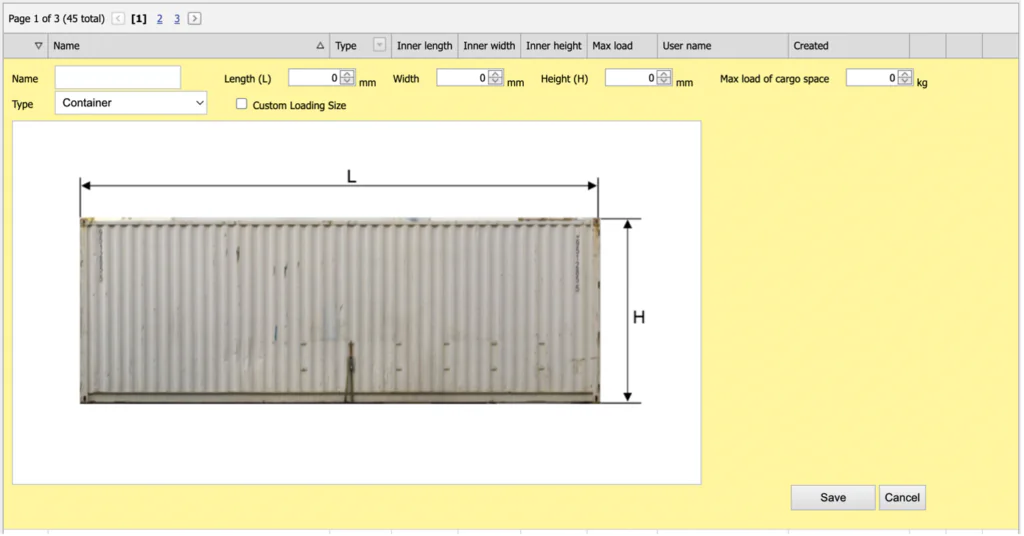
Also, in our experience, even small differences in set inner dimensions can have a large impact on how the loading plan is created. Furthermore, we provided a long list of preset cargo spaces of different dimensions and types. These can be used directly or as a template for your cargo space.
…loading plan?
First, you need to know the volume of your container or other cargo space in m³. In case you don’t know the volume, here is the formula for calculation:
Volume = Length × Width × Height
Next, you will need to calculate the volume of each item you want to place in the container. Create a simple table with a list of items and add the following information for each one: length, width, height, amount, and ideally, weight. Then, for each type of item, you must input the dimensions and the amount you will have to load into the containers.
Once you have all of the data you need, it’s time to apply the same formula you just used to calculate the volume of the containers, but this time, to calculate the individual volume of each item. You will multiply the volume by the number of items and add up all the results in the end. That will give you the total volume of the items that have to be loaded.
Alright, now is the time to calculate the number of containers needed to load all of the items. How? Just by dividing the total volume of items by the volume of the container you calculated in the first step.
Unfortunately, this is never exact enough. Most cargo items will never be able to be stacked in a way that fully utilizes the container’s volume. So it’s always a good idea to leave a small reserve to ensure that all items really fit into the cargo space. The general recommendation is to leave around 10% of the cargo space empty when loading containers. This reserved space helps account for irregularities in the dimensions of the cargo.
Is there too much calculating to do? Use EasyCargo
In the EasyCargo app, you don’t need to create any tables. Everything is already set up. All you need to do is enter the required dimensions of the individual items.
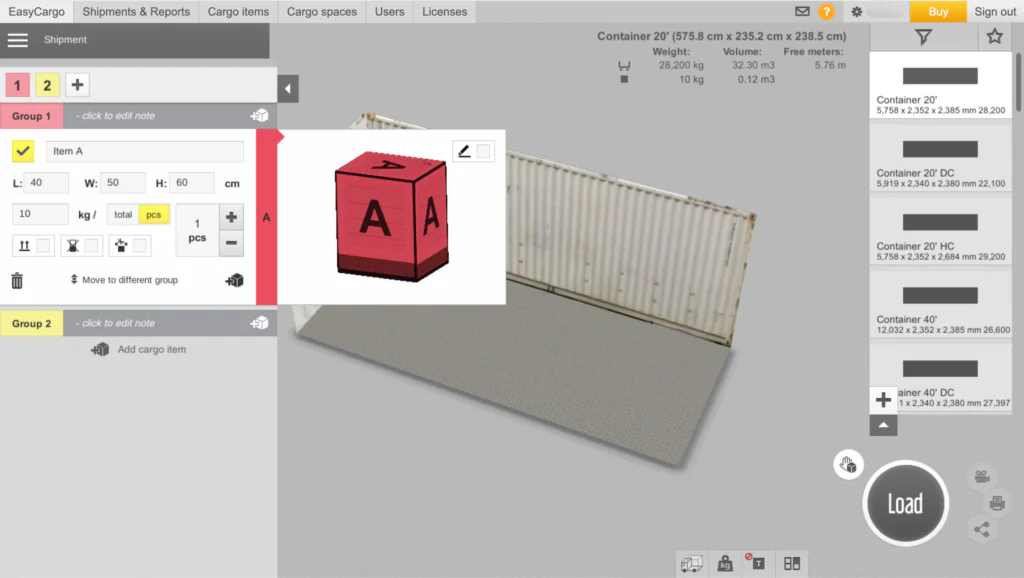
Once you set the size, weight and amount for each type of item you want to load, press the Load button.
EasyCargo will tell you right away how many of your cargo items will fit into your selected cargo container as well as give you a plan on how to load the container with your items.
Alternatively, in the case that all of your items do not fit into the selected container, you can load the remaining items into different cargo spaces. The application will subtract loaded items from the total and add them to more containers as a separate load plan. From here, EasyCargo will allow you to customize the next plan manually with the remaining items.

The headache begins when restrictions on the shipment appear
So far, you know the amount of “cargo spaces” you need to load all the cargo, but you don’t know how to arrange them. It’s easy when you are dealing with only one type of item, but what happens when you combine different types of items that have different sizes and weights?
Let’s make this even harder. What happens when you need a specific order of loading or unloading cargo items? Let’s say you want to unload certain items before others, or that you want to avoid mixing certain types of items, like piling them. This could lead to a considerable amount of groups, and it can be complicated to deal with such situations while trying to do all the planning manually.
But that is alright. We have good news for all of you – that’s where EasyCargo excels!
In EasyCargo, “Priority groups” make shipment planning a piece of cake
If you want to divide items into priority groups by hand, you need to plan with virtual “walls” in the container or truck. This basically means that the cargo space will be divided into smaller compartments, one for each priority group. Therefore, there must be a count of how many individual items each compartment will fit and then the walls can be set. This is a slow and repetitive process that involves spending a lot of time counting and using the calculator.
Moreover, a real-life scenario can be that the company plans to ship just one truck or container and no more. At the same time, they know they have more items to fit in than the capacity of the container allows. Therefore, they need to decide which items get shipped and which stay. Oftentimes, the people responsible for the planning of the shipment have a vague estimate of how many items each “compartment” can fit, but it is impossible to confirm whether their estimates can be trusted until they finish planning the load. Most of the time, they are also asked to have a minimum amount of units of certain items in the cargo space. It is a really complicated task to try and fill up the container completely and fulfill these requirements.
What can easily happen is that the person who plans the shipment realizes only when loading the shipment into a trailer that the initial estimate was not precise enough and the groups/items are not balanced appropriately.
As a result, the process must begin again by reducing or increasing the number of cargo items in the different compartments to redistribute the amount of each item that the compartments will fit. Of course, this means doing the math all over again, and still, playing with the numbers by hand is dangerous because there is no guarantee the next attempt to plan it will be more precise and fulfill the requirements.

What is our advice? Use EasyCargo
EasyCargo offers a range of features and tools that easily handle these requirements so you won’t have to spend hours figuring out how to stack everything in the container.
Priority Groups feature
Priority groups make shipment planning a piece of cake. Thanks to this feature, you can easily divide items into different priority groups based on the order in which you need to unload them. You can also use this feature to keep certain items together. The software will then create an optimal loading plan based on these requirements.
Other specific requirements
In the app, you also have the option to select restrictions such as:
- Do not tilt this cargo item.
- Do not stack on this cargo item.
- Do not rotate this cargo item.
This way, you can easily ensure that even fragile goods are transported without damage.
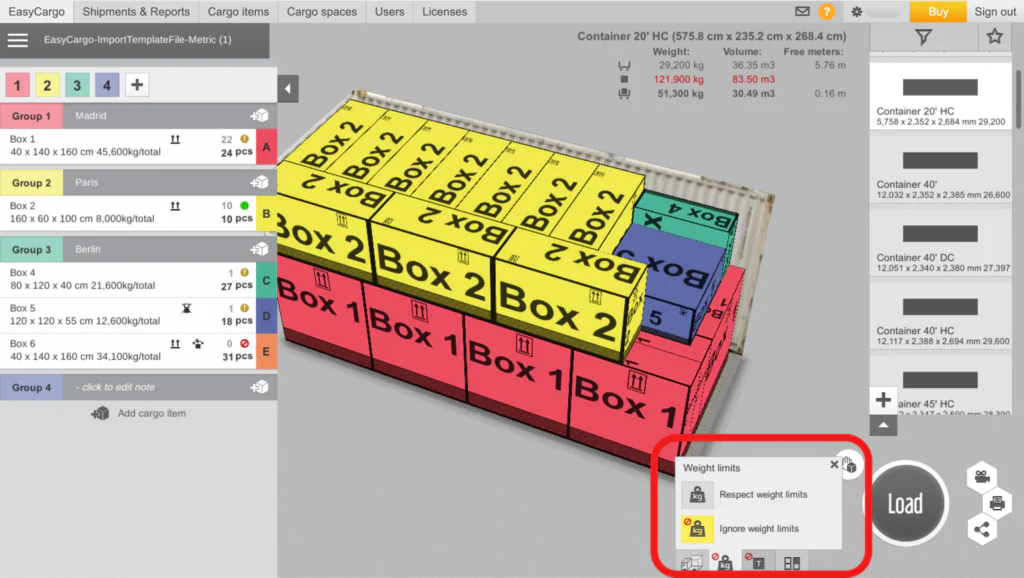
Respect weight limits
Check the «respect weight limits» option, and you can be sure that your shipment will comply with weight limits, ensuring safe and efficient weight distribution in the container or in other cargo spaces.
Manual loading
EasyCargo will automatically create a loading plan for you, but that doesn’t mean you can’t adjust it to suit your needs. You can freely move individual items or even create the entire loading plan manually.
Tip: Read about all the other features of EasyCargo.
Are you ready to take your load planning to the next level? Try the EasyCargo app for 10 days free and explore all of the features and tools that will make your planning easier.
With EasyCargo, within a few seconds, you can have the shipment revised. Even if you don’t like the distribution of items between groups or feel like the quantities are not balanced, you can readjust the number of pieces and the groups. As a result, the shipment can easily be ready once again within a moment’s notice.
If you are interested in some more information about how EasyCargo allows you to better organize cargo item types (for example, loading/unloading them in a certain order or making sure certain items do not get mixed up in the cargo space), check this journal article that contains a deeper explanation on how such functions works.
Frequently Asked Questions
1. What is a loading plan?
A loading plan is a layout that shows you how to load individual items into the cargo space. Why are loading plans created? To optimize space usage, avoid wasting time rearranging items, ensure even weight distribution, and make sure the goods aren’t damaged during transport.
2. How do you calculate container space?
To calculate container space, you can use this simple formula: Volume = Length × Width × Height. However, make sure to use the internal dimensions of the container when calculating. Are you curious about how to calculate Payload capacity or curb weight? Check out the article to find out.
3. How do you calculate the container loading plan?
You can either measure your cargo‘s volume and compare it to the container‘s capacity or use loading software that will calculate it for you. It also offers a wide range of additional features that will come in handy when creating your load plan.